Automations: Redirects, Assign Study Template, Qualification, Quit Study
Last updated: June 9, 2025
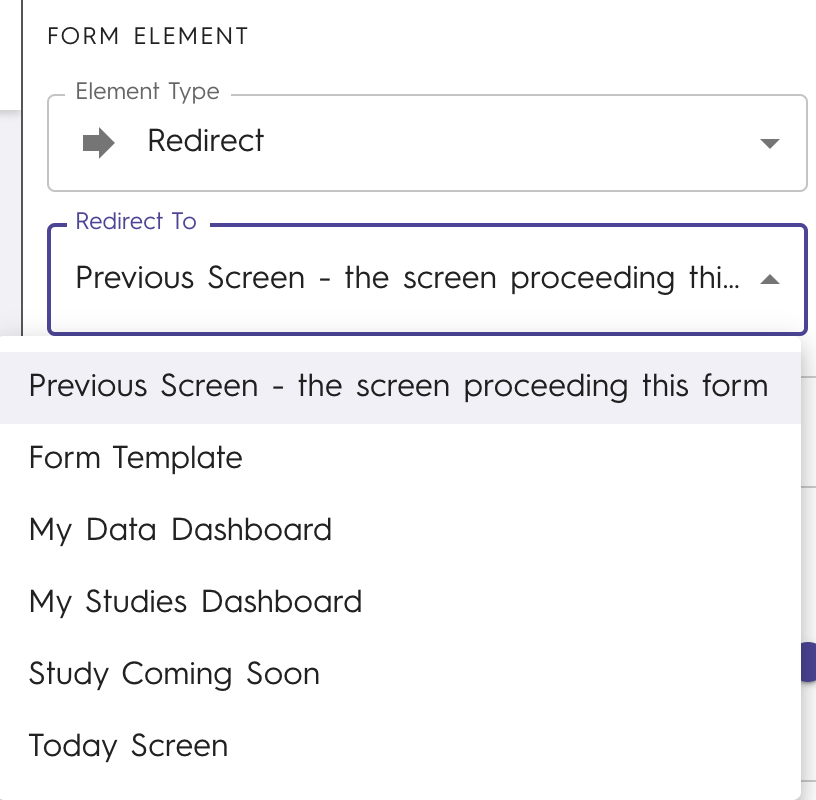
Redirect is the most basic automation and is used to return users to a Chloe screen. When creating a redirect, put it in the final section of the form on its own. For the Section, make the section type ‘Final’ so the form will be marked as completed by the user once they are redirected.

Assign Study Template, Qualification, and Quit study are used in combination with Branching Logic. When making transitions for the section prior to an automation, click + Add Condition, and define how participants move through the form.
Quit Study removes users from the study and returns them to a specified screen. It can be used in combination with Branching Logic to withdraw participants.
Always test your forms and all branching logic prior to sharing them with participants.
Qualification is used only with Qualification Forms. It is used to assign the form respondent a participant status of qualified, not qualified, or no qualification to determine if a participant is qualified for not. Keep in mind that this automatically marks users as qualified, thus forms that require review (e.g. photo review) should not use it
Assign Study Templates allows different Study Templates to be used to give participants in the same study different experiences like in cohort studies. These can be used to give different forms based on sex or other criteria (e.g. menstrual cycle tracking, different intervention start dates).