How to Set Up BMI Calculation in Chloe
Last updated: February 4, 2026
Overview
This article outlines the protocol for setting up Body Mass Index (BMI) calculations within a Chloe study. BMI is a derived value calculated using participant-entered height and weight. Chloe supports real-time BMI calculation through form logic using JavaScript syntax and dynamic field assignments.
Step-by-Step Setup
1. Height Field Setup
Set-up a height field in one section of the form that you would like to contain the BMI calculation.
Recommended Format: Use a dropdown menu that displays height in feet and inches for participant clarity.
System Functionality: Each selection corresponds to a pre-converted meter value that is used for BMI calculation.
Reference Table: See the Height Dropdown Mapping section below for the list of saved values and visible options that can be copied into the Free Form section of Chloe.
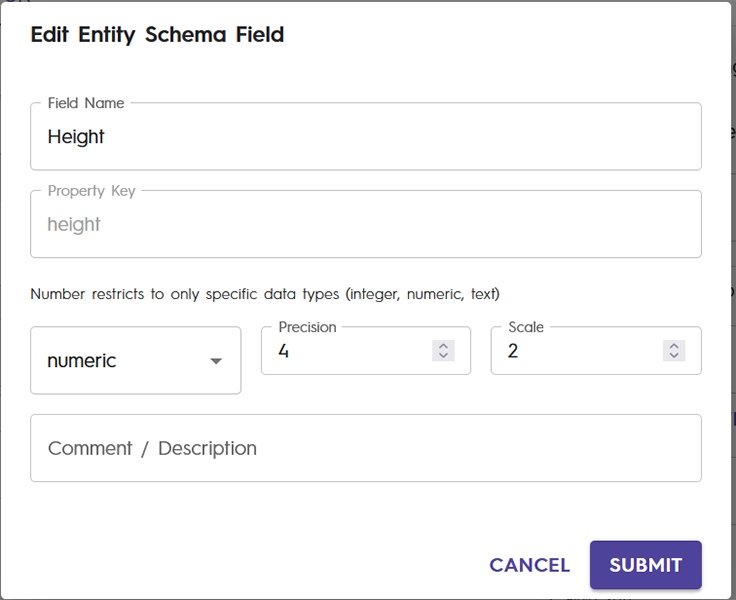
Schema Field: Name your schema field Height and code it as a numeric value with precision 4 and scale 2.
Precision is the total number of digits that you would like saved in a decimal number, both to the left and right of the decimal point.
Scale is the number of digits that you would like saved to the right of the decimal point.
2. Weight Field Setup
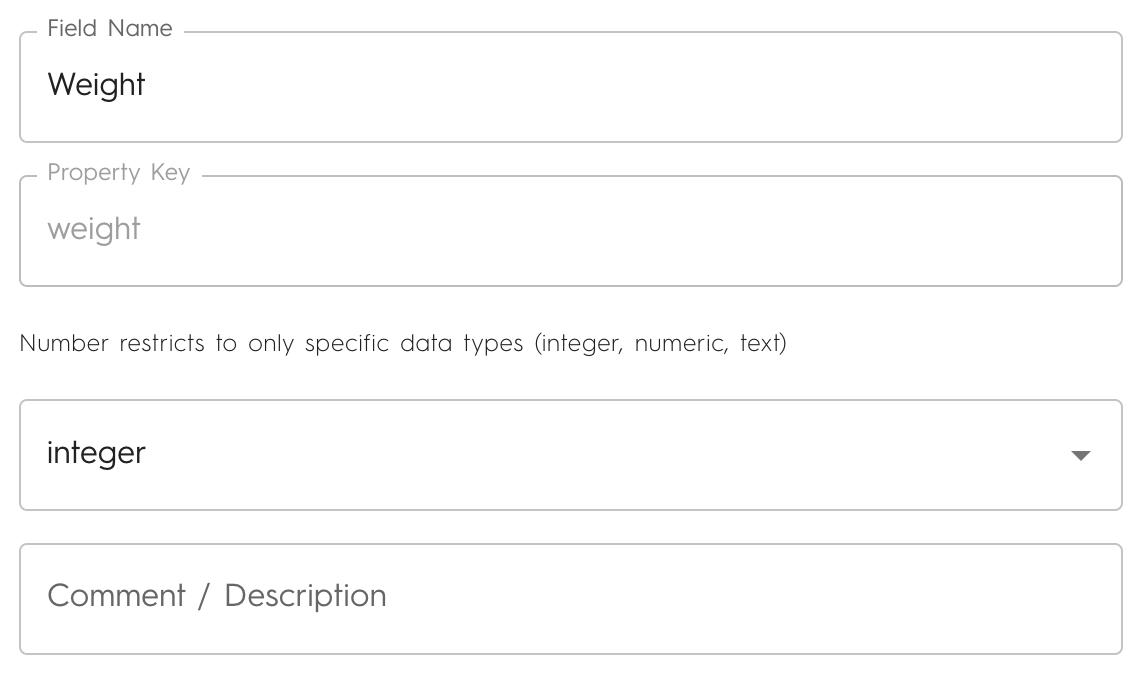
Recommended Format: Use a numerical input field where participants enter their weight in pounds.
Schema Field: Name your schema field Weight and code it as an integer value.
3. Assign Action After Entry
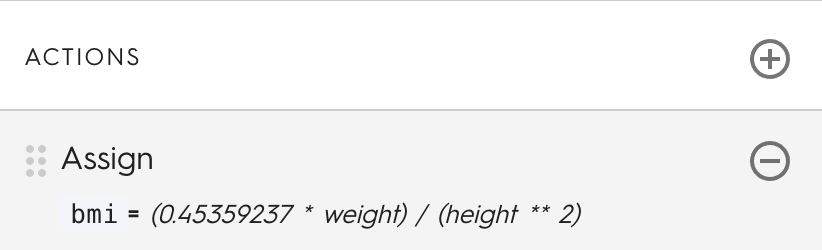
Add an "Assign" action to the weight field so that after participants complete both the height and weight fields their BMI is calculated.
This action will trigger the calculation of the BMI value and store the result in a designated field (BMI).
4. Variable Specification
Choose or create a data variable (e.g.,
bmi) to store the calculated BMI value.
5. BMI Calculation Setup
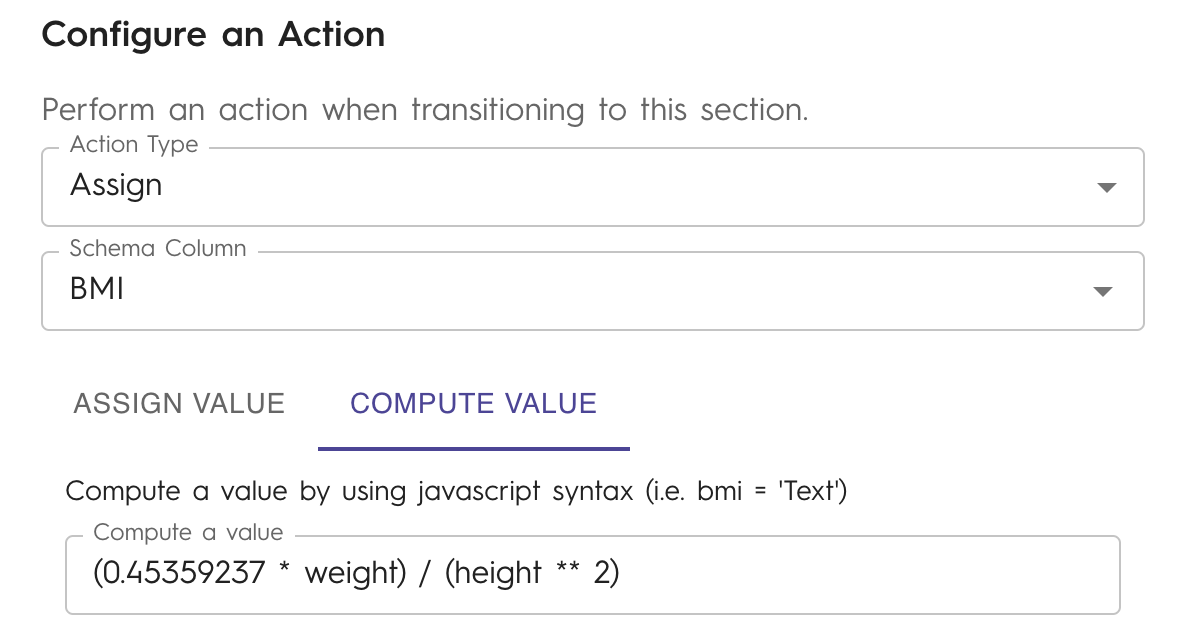
In the Assign action, switch to "Compute a value".
Use the following JavaScript formula to calculate BMI:
(0.45359237 * weight) / (height ** 2)
💡 Note:
weightshould be in pounds.heightshould be in meters (as selected via the dropdown).The formula converts pounds to kilograms and uses meters for height to calculate BMI in kg/m².
Height Dropdown Mapping
Use this table to configure the height dropdown options in your form:
Key:
saved meter value|participant representation
Copy below
1.22|4 ft.
1.24|4 ft. 1 in.
1.27|4 ft. 2 in.
1.3|4 ft. 3 in.
1.32|4 ft. 4 in.
1.35|4 ft. 5 in.
1.37|4 ft. 6 in.
1.4|4 ft. 7 in.
1.42|4 ft. 8 in.
1.45|4 ft. 9 in.
1.47|4 ft. 10 in.
1.5|4 ft. 11 in.
1.52|5 ft.
1.55|5 ft. 1 in.
1.57|5 ft. 2 in.
1.6|5 ft. 3 in.
1.63|5 ft. 4 in.
1.65|5 ft. 5 in.
1.68|5 ft. 6 in.
1.7|5 ft. 7 in.
1.73|5 ft. 8 in.
1.75|5 ft. 9 in.
1.78|5 ft. 10 in.
1.8|5 ft. 11 in.
1.83|6 ft.
1.85|6 ft. 1 in.
1.88|6 ft. 2 in.
1.91|6 ft. 3 in.
1.93|6 ft. 4 in.
1.96|6 ft. 5 in.
1.98|6 ft. 6 in.
2.01|6 ft. 7 in.
2.03|6 ft. 8 in.
2.06|6 ft. 9 in.
2.08|6 ft. 10 in.
2.11|6 ft. 11 in.
2.13|7 ft.
2.16|7 ft. 1 in.
2.18|7 ft. 2 in.
2.21|7 ft. 3 in.
2.24|7 ft. 4 in.
2.26|7 ft. 5 in.
2.29|7 ft. 6 in.
2.31|7 ft. 7 in.
2.34|7 ft. 8 in.
2.36|7 ft. 9 in.
2.39|7 ft. 10 in.
2.41|7 ft. 11 in.
2.44|8 ft.