User Roles & Their Capabilities
Last updated: January 23, 2026
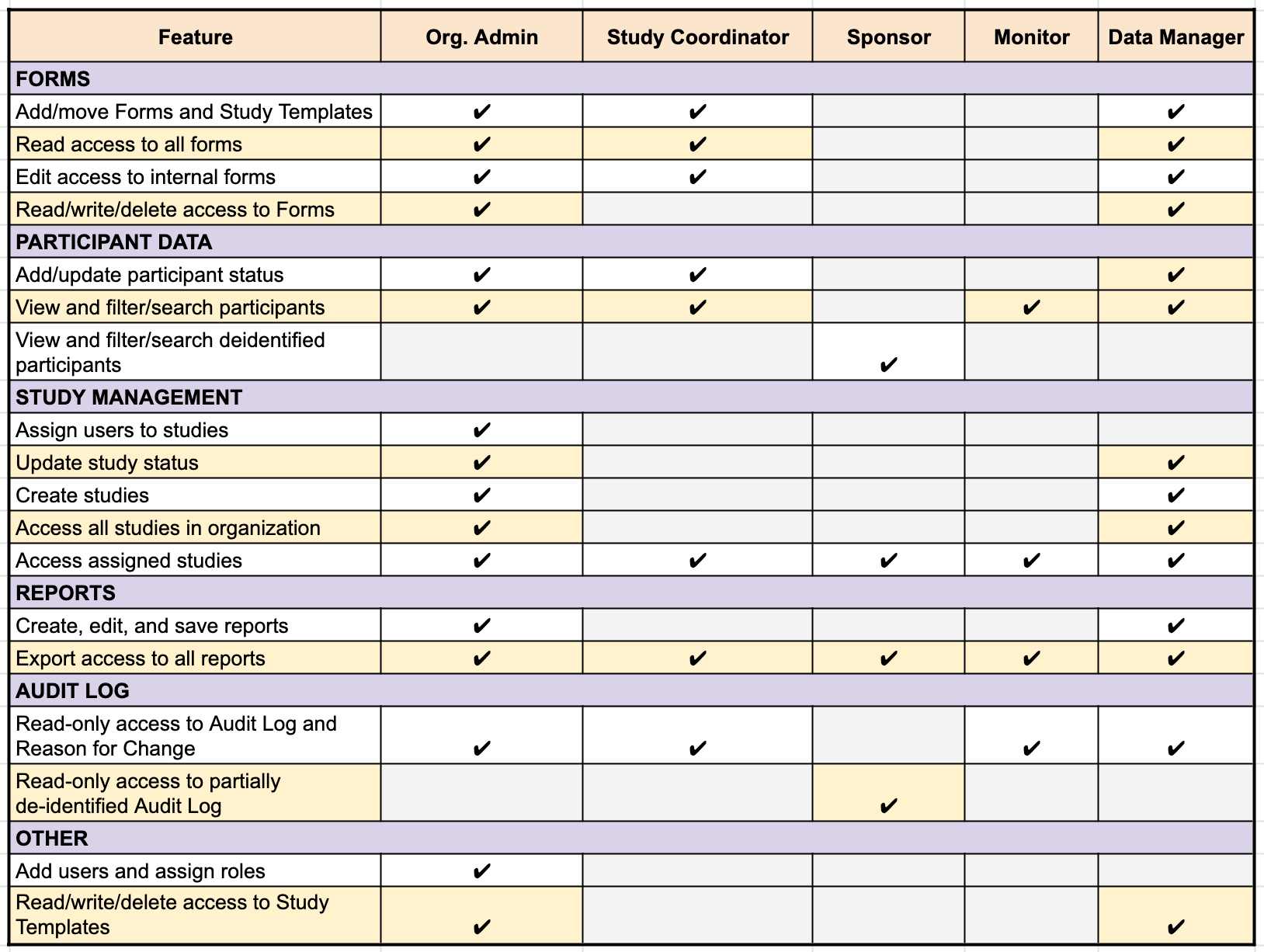
Within an organization, roles can be assigned to different study team members to manage their access within Chloe. Refer to the table below for an easy comparison of all roles and their functions.
Organization Admin: Full Organization Access.
Access all studies, create and edit studies, ability to manage users and roles, assign users to studies, update study statuses. Possesses coordinator-level permissions. Can create reports, and import participants.
Study Coordinator: Participant Management.
Focused on running the study. Can view study details and reports. import and manage participants, their statuses, view and filter participants, manage forms and study templates, read and edit forms, read-only access to the Audit Log, and export reports in assigned studies. Read-only access to study build/configuration. Views full participant identity.
Data Manager: Study & Data Design.
Focused on building studies and managing data. Access all assigned studies, full permissions for creating and editing forms and study templates, create studies, update study statuses, and manage reports.
Cannot import participants.
Sponsor: Read-Only Observer.
Can view study progress, participant counts, logs, and reports. Access assigned studies, view de-identified participant lists, read partially de-identified Audit Log, and export reports in assigned studies.
No write access to studies or participants.
PII is redacted (cannot see names/contact info).
Monitor: Compliance Viewer.
Similar to the Sponsor account type, typically used for clinical monitors verifying valid data. Access assigned studies, view and filter participants, read-only access to study data, reports and the Audit Log. Can export reports in assigned studies.
Views full participant identity.
Study Coordinators, Data Managers, and Organization Admins can see identifiable data. Within an organization, roles can be assigned to different study team members to manage their tiers of access within Chloe.