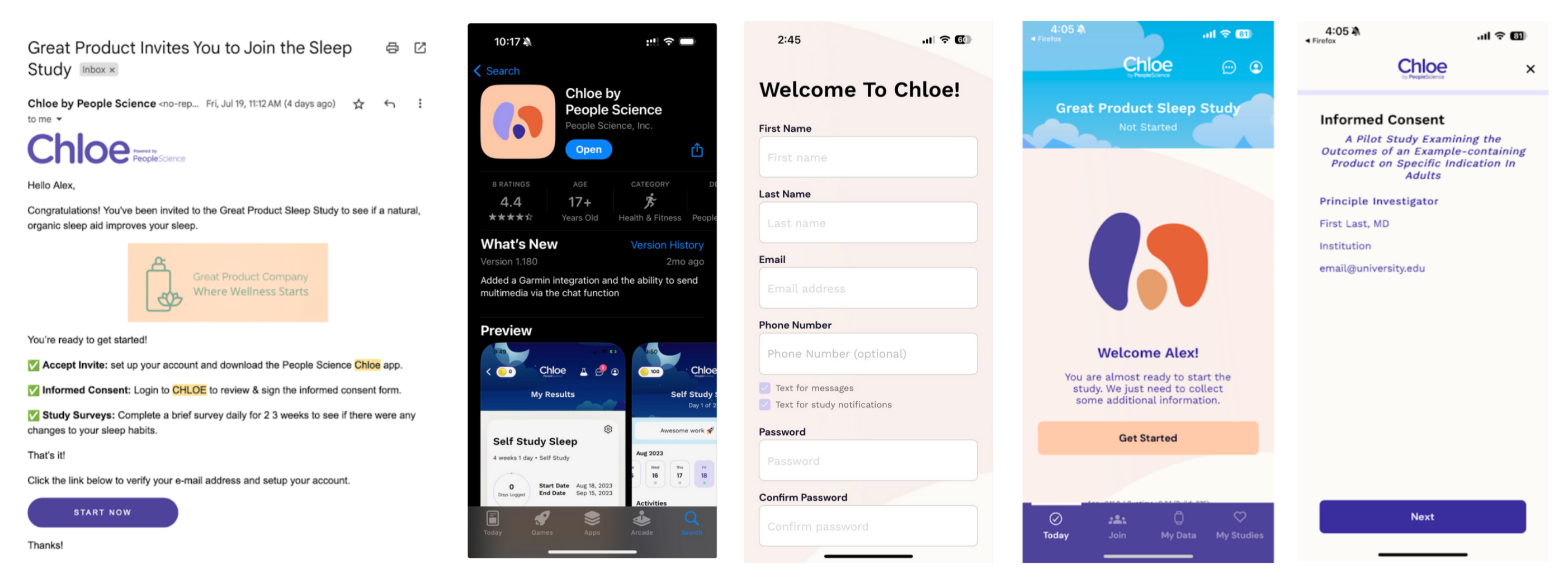
Customized Email Invitations
Last updated: July 30, 2025
If inviting users to join your study via email (rather than the join screen), you can customize the email in the Study Info Section.
Navigate to Your Study Page then click the Study Info tab.
Customize the text in the rich text editor.
Send yourself a test email:
If you have not yet already, add yourself to the study
Click your name → Send Invite → Email


To send emails to multiple participants:
Select participants by checking the box next to them, or click the top box to select all participants.
Click the ‘...’ in the purple circle and select email.
Emails will be sent from: no-reply@peoplescience.health
From the Participants tab you can see when an email was sent and if a user accepted their invite. Communicating with participants through sponsor email accounts (e.g. clear instructions, study overview, reminders as needed), in addition to Chloe correspondence will help users with onboarding.
All participants added to a study via email will automatically be consent and enroll in the study when they log into Chloe the first time.
Email Invite User Experience: