Chloe Admin Portal - Forms
Last updated: July 22, 2026
The Forms screen provides a list of all forms built for the currently selected study and provides details for each Form.
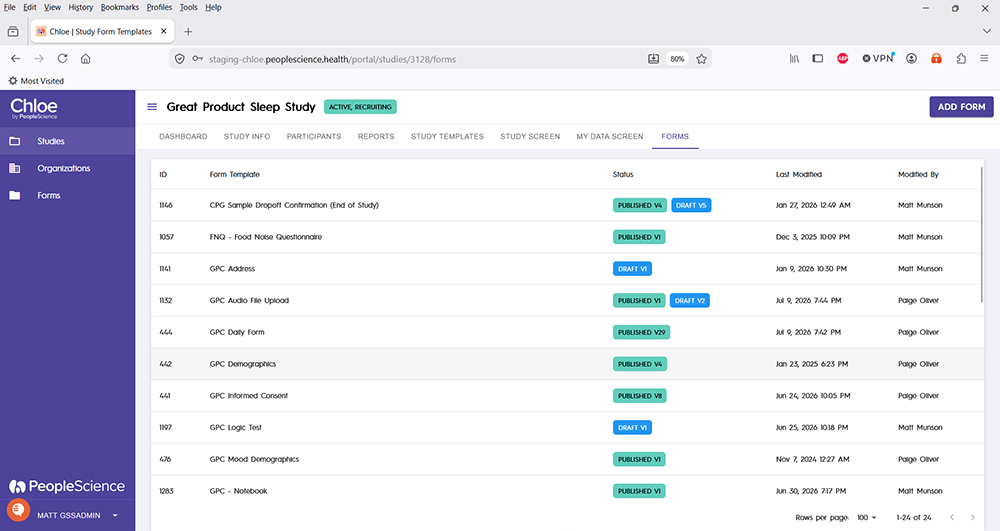
ID: A unique identifier given to each form in your study
Form Template: The unique name of the form.
Status: The green Published status block will indicate the version of the form that is currently in use in the study. If there is a blue Draft block, that will indicate that changes have been made to the form but have not yet been published. The version number in the blocks indicate the major version number of the form.
Last Modified: The date of the most recent changes made to the form.
Modified By: The name of the Chloe user who performed the most recent changes to the form.
Click on any line item to open the form in Form Builder.
Use the Add Form button to create a new form in this study.
For a tutorial on Form building, please refer to the following article: 📄 Intro to Form Building
For an overview of all screens available for a study in the Chloe Admin Portal, please refer to this knowledge base article: 📄 Chloe Admin Portal - Overview & Introduction