Phone Number - Form Element
Last updated: July 8, 2026
Use this Form Element to capture a participants phone number. Unlike other Form Elements, this one does not require you to define a Schema Field, as the platform has already done it for you, behind the scenes. Data captured from this Form Element type is mapped directly to the Participant Data Model.
International prefixes are supported.
The form also has two check boxes to captured a participants communication preferences. Enabling "Text Notification for Messages" will enable chloe to send text alerts when the platforms messaging functionality is used. Enabling "Text Notifications for Study" will allow the Chloe platform to send the participant texts when study activities are due or overdue.
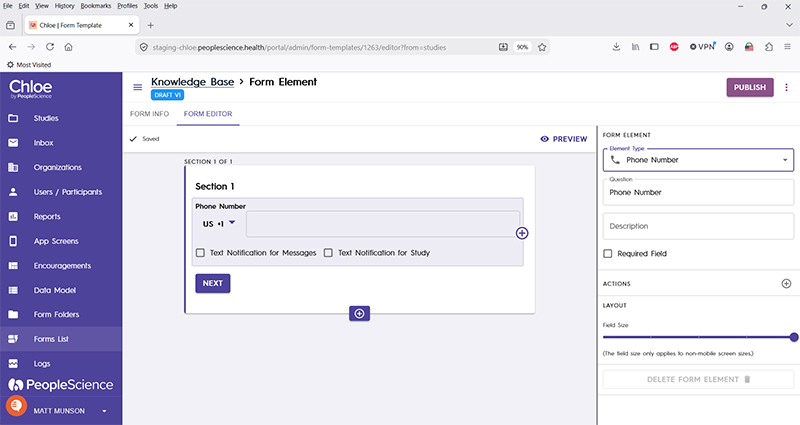
Question | The primary text displayed for this element. Bold by default. |
Description | Secondary text for this element type. Displayed beneath the "Question" text. Not bold. |
Required Field | Check this to require participant input. Enabling this option will forbid the user from advancing to the next section until a response is made in this Form Element. |
Actions | |
Layout | |
Delete form element |
For an introduction to Form Elements, a complete list of them and articles on how to use them, please visit this article: 📄 Form Elements
For an overview of Schema Fields and how form results look exported click here.