Date - Form Element
Last updated: July 8, 2026
This Form Element type is used to capture a date (day, month, year) from the participant.
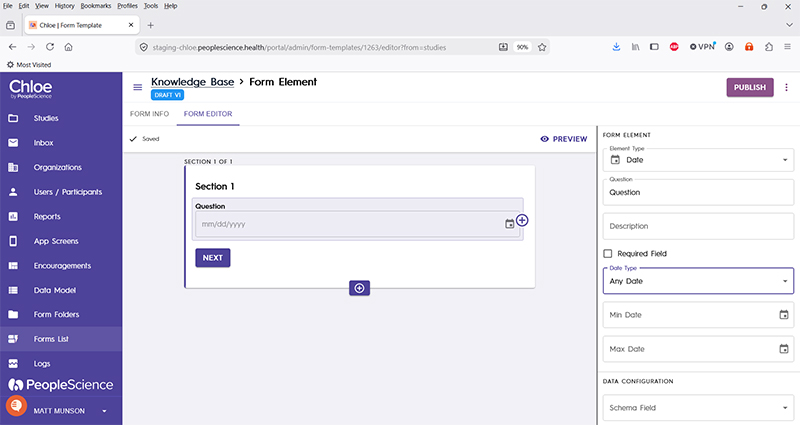
Question | The primary text displayed for this element. Bold by default. |
Description | Secondary text for this element type. Displayed beneath the "Question" text. Not bold. |
Required Field | Check this to require participant input. The section will not allow the user to advance until they input something into this element's field. |
Date Type | A dropdown menu with the following options available: Any Date - Allows the user to pick any date in the future or past. Birth Date - Allows the user to pick any date in the past, but none from the future. Future Date - Allows the user to pick any date in the future, but none from the past. Today's Date - Automatically populates the date picker with today's date. |
Min date | The farthest back in time that a participant is allowed to select. Can be configured by manually entering mm/dd/yyyy or using the calendar picker. |
Max date | The farthest into the future that a participant is allowed to select. Can be configured by manually entering mm/dd/yyyy or using the calendar picker. |
Schema Field | |
Actions | |
Layout | |
Delete form element |
For an introduction to Form Elements, a complete list of them and articles on how to use them, please visit this article: 📄 Form Elements